
Customer Support
What is a snapshot of my VPS?
A snapshot is an instant, one-to-one copy of your VPS’s exact state at the moment it’s taken — including all files, the operating system, settings, and databases.
When you create a snapshot through your control panel, the system stores that specific point-in-time image of your VPS. The snapshot remains available until you delete it manually.
Important: Restoring a snapshot reverts the entire system to the state it was in when the snapshot was taken. You cannot recover individual files from it.
Snapshot vs Backup – What’s the difference?
Although both are types of “data copies,” there are key differences between them:
| Feature | Backup | Snapshot |
|---|---|---|
| Automation | Created automatically | Created manually |
| Retention period | Kept for a limited time | Kept until manually deleted |
| File recovery | Allows recovery of individual files | No – restores the full system |
| Recovery flexibility | More flexible (select files or databases) | All or nothing |
| History | Includes multiple restore points | Captures only one specific point in time |
How to use a Snapshot
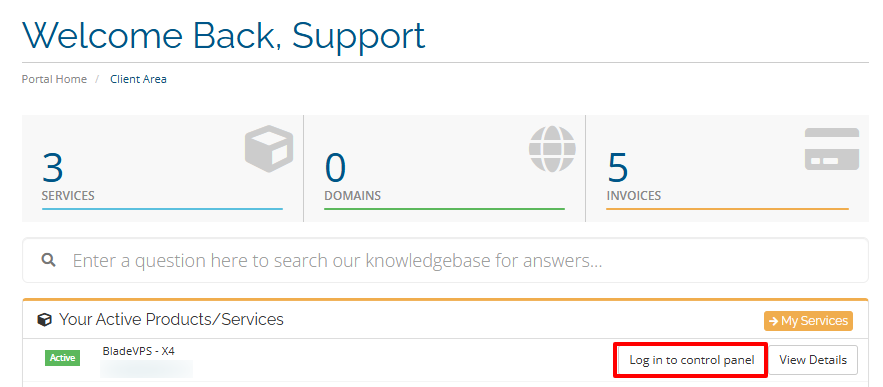
- Locate the VPS hosting package you want to manage from the menu in your control panel and click Log in to control panel.
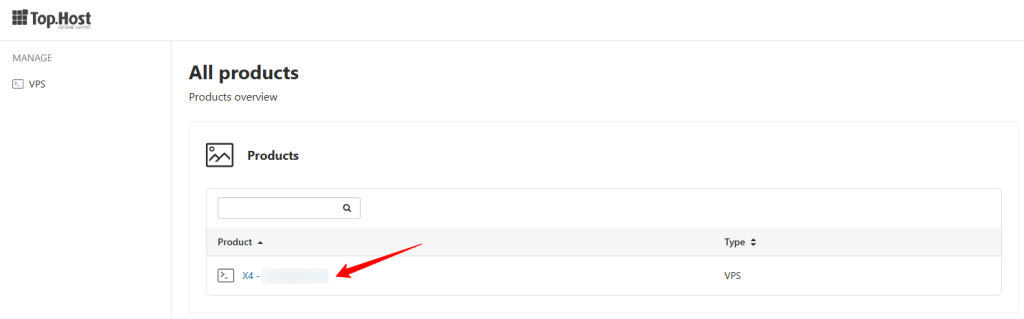
- Click on the desired plan
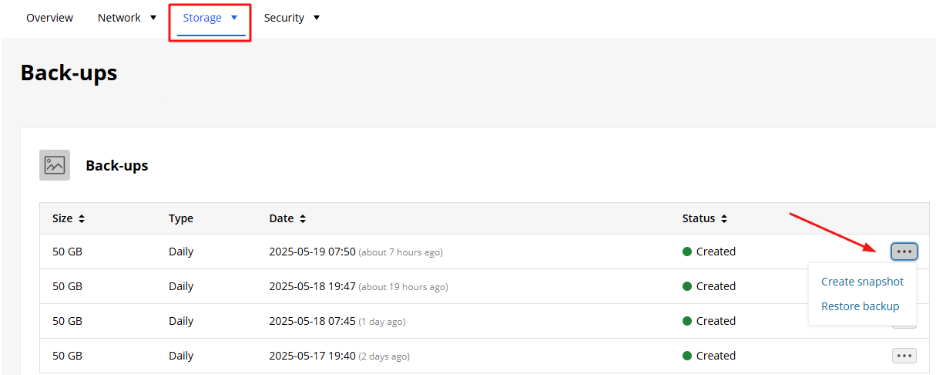
- Go to the Storage tab
From there, choose one of the following:
- Click Backups → then the three dots → Create Snapshot, or
- Click Snapshots → then select Add

- If possible, temporarily stop your VPS for improved data consistency.
- The snapshot will be saved and can be restored whenever needed. The space it occupies is not counted against your VPS storage quota.
Note: You can also restore a snapshot to another VPS, as long as it has at least the same technical specifications.
Frequently Asked Questions (FAQ)
Can I recover individual files from a snapshot?
No. A snapshot restores the entire VPS to the state it was in when it was created.
How many snapshots can I have?
This depends on your hosting provider. Usually, there is a limit (e.g. up to 20 snapshots per VPS).
What happens if I delete my VPS?
All snapshots associated with that VPS will also be deleted.
What happens to my IP address if I restore a snapshot to a new VPS?
If your IP changes, you may encounter issues with software licenses (e.g. cPanel, Plesk) that are bound to a specific IP address. Note that switching to a new VPS plan usually involves a change of IP.
You haven't found what you are looking for?
Contact our experts, they will be happy to help!
Contact us